
Complete Guide to Blocking Partial Page Content from Search Engines
Introduction: Why Block Partial Content from Indexing
Not every element on your webpage deserves search engine attention. Sidebars with conversion hooks, newsletter signups, and promotional content can confuse Google's understanding of your main content, ultimately hurting your SEO performance.
When irrelevant page sections get indexed alongside your primary content, search engines struggle to determine your page's true focus. This dilutes your topical authority and can negatively impact your internal linking structure and knowledge graph development.
Understanding Search Engine Crawling Behavior
Search engine bots crawl your entire page by default, treating sidebar content, main content, and promotional elements with equal importance. This creates noise in Google's understanding of your content hierarchy.
Key crawling challenges:
- Mixed content signals confuse search algorithms
- Promotional content dilutes main topic relevance
- Internal linking structure becomes unclear
- User-generated content may not align with page intent
The Multi-Method Approach: Layered Protection Strategy
Single blocking methods act as "hints" to Google rather than definitive instructions. Search engines may choose to ignore individual directives, making a layered approach essential for reliable content control.
The 4-method strategy combines:
- Data-nosnippet attribute - Prevents snippet display
- Robots meta tags - Blocks indexing at file level
- Robots.txt directives - Server-level blocking
- HTML semantic markup - Signals content importance
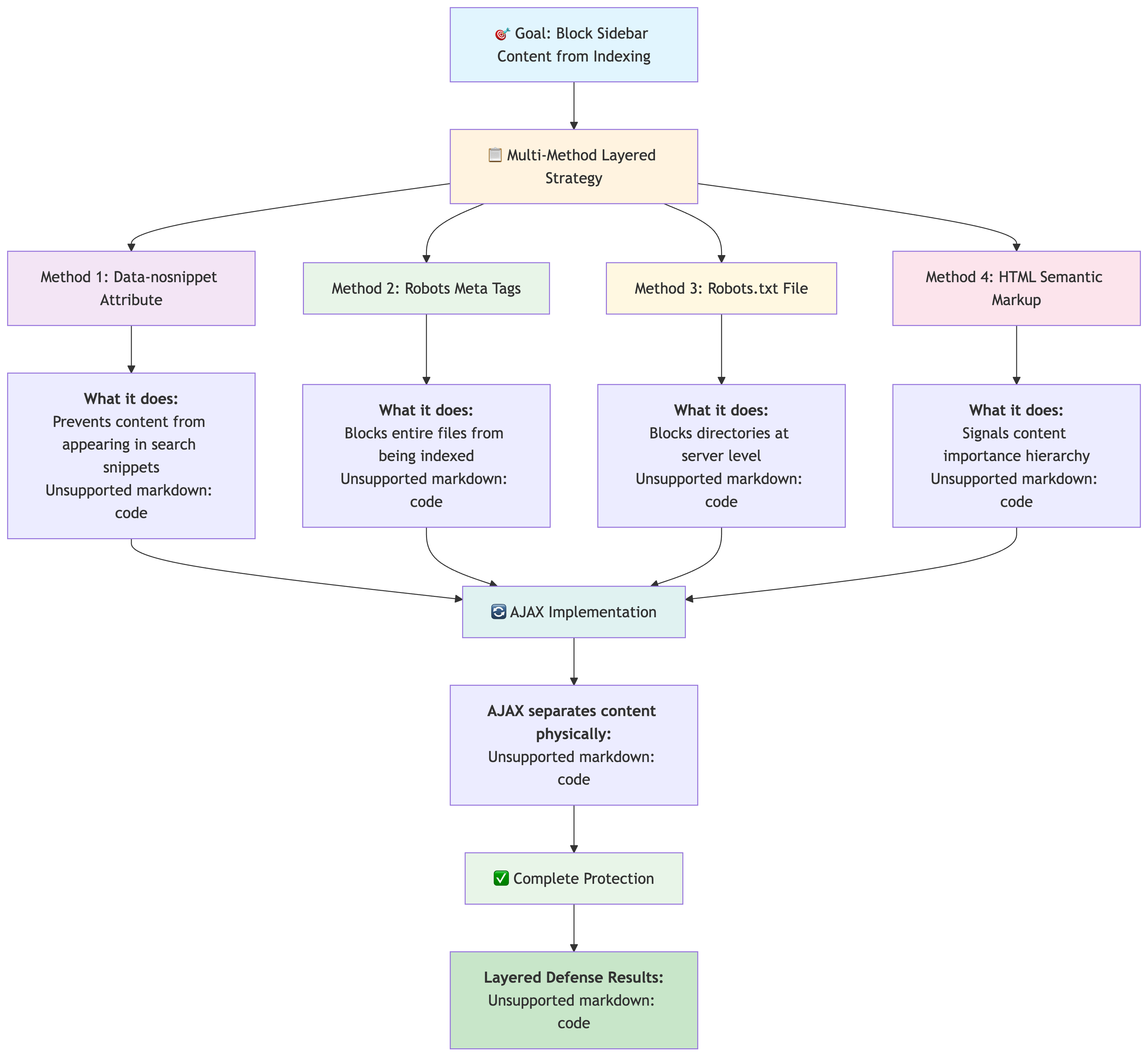
Method 1: Data-nosnippet Attribute Implementation
The data-nosnippet attribute prevents specific content sections from appearing in search result snippets while still allowing the content to be crawled and indexed.
Basic Implementation
<div data-nosnippet>
  <h3>Newsletter Signup</h3>
  <p>Join our mailing list for exclusive updates!</p>
  <form>
    <input type="email" placeholder="Enter your email">
    <button type="submit">Subscribe</button>
  </form>
</div>
Multiple Element Targeting
<p>This text appears in search snippets
<span data-nosnippet>but this promotional text won't appear</span>
and this text will appear again.</p>

<aside data-nosnippet>
  <div class="sidebar-widget">
    <h4>You Might Also Like</h4>
    <ul>
      <li><a href="/course1">Photography Course</a></li>
      <li><a href="/course2">Advanced Editing</a></li>
    </ul>
  </div>
</aside>
Advanced Data-nosnippet Techniques
Boolean Values (All Treated as True):
<div data-nosnippet="true">Hidden from snippets</div>
<div data-nosnippet="false">Also hidden from snippets</div>
<div data-nosnippet="">Still hidden from snippets</div>
⚠️ Important: All
data-nosnippetvalues are treated as true, regardless of the actual value.
Nested Elements:
<section data-nosnippet>
  <h3>Conversion Section</h3>
  <div class="cta-box">
    <p>Start your free trial today!</p>
    <button>Get Started</button>
  </div>
  <!-- All nested content is excluded from snippets -->
</section>
Unclosed Tags (Dangerous):
<!-- AVOID: This will exclude everything after the opening tag -->
<div data-nosnippet>
  <p>This content won't appear in snippets</p>
<!-- Missing closing div tag affects all subsequent content -->
<p>This content also won't appear in snippets</p>
Method 2: Robots Meta Tag Strategy
Robots meta tags are simple HTML instructions that tell search engines what to do with your web pages. Think of them as "Do Not Enter" signs for specific content. When you put a robots meta tag in a webpage's header, it's like putting up a sign that says "Google, don't add this page to your search results." This method works great for blocking entire sidebar files or promotional pages that you don't want appearing in search results, while keeping your main content visible.
Basic Robots Meta Implementation
Create a separate file for sidebar content with proper meta tag directives:
sidebar-content.html:
<!DOCTYPE html>
<html lang="en">
<head>
  <meta name="robots" content="noindex, nofollow">
  <meta name="googlebot" content="noindex, nofollow">
  <title>Sidebar Content</title>
</head>
<body>
  <div class="sidebar-content">
    <h3>Related Courses</h3>
    <p>Explore our photography courses designed for professionals.</p>
    <ul>
      <li><a href="/beginner-photography">Beginner Photography</a></li>
      <li><a href="/advanced-editing">Advanced Photo Editing</a></li>
      <li><a href="/studio-lighting">Studio Lighting Mastery</a></li>
    </ul>

    <div class="newsletter-signup">
      <h4>Join Our Newsletter</h4>
      <form action="/newsletter" method="post">
        <input type="email" name="email" placeholder="Your email address">
        <button type="submit">Subscribe</button>
      </form>
    </div>
  </div>
</body>
</html>
Targeted Robot Directives
Search Engine Specific Targeting:
<!-- Block only Google -->
<meta name="googlebot" content="noindex, nofollow">

<!-- Block all search engines -->
<meta name="robots" content="noindex, nofollow">

<!-- Block with additional directives -->
<meta name="robots" content="noindex, nofollow, noarchive, nosnippet">
Time-Based Exclusions:
<!-- Remove from index after specific date -->
<meta name="googlebot" content="unavailable_after: 31-Dec-2024 23:59:59 EST">

<!-- Combination with other directives -->
<meta name="robots" content="noindex, unavailable_after: 15-Mar-2025 12:00:00 PST">
Advanced Directive Combinations:
<!-- Prevent indexing but allow following links -->
<meta name="robots" content="noindex, follow">

<!-- Allow indexing but prevent snippet generation -->
<meta name="robots" content="index, nosnippet">

<!-- Maximum snippet length control -->
<meta name="robots" content="max-snippet:50, max-image-preview:large">
Method 3: Robots.txt File Configuration
Robots.txt is a simple text file that sits at the root of your website and acts like a security guard for search engines. While robots meta tags (Method 2) work inside individual webpage files, robots.txt works at the server level to block entire folders or files before search engines even try to access them.
Think of Method 2 as putting "Do Not Enter" signs on specific rooms, while Method 3 is like having a security guard at the building entrance who stops visitors from reaching certain floors entirely.
Here's the smart approach: You can create a dedicated folder (like /sidebar-content/) that contains all your sidebar files used across your entire website - newsletter signups, course recommendations, social widgets, etc. Then use one simple robots.txt rule to block that entire folder from being indexed. Your main pages load this sidebar content dynamically via AJAX, so users still see everything, but search engines can't access or index any of the promotional content. It's like having a separate building for all your promotional materials that only your website visitors can enter.
Basic Robots.txt Structure
robots.txt:
User-agent: *
Allow: /

# Block sidebar content files
Disallow: /includes/sidebar/
Disallow: /widgets/
Disallow: /promotional-content/

# Block specific sidebar files
Disallow: /sidebar-content.html
Disallow: /newsletter-widget.html
Disallow: /related-products.html

# Allow main content
Allow: /blog/
Allow: /articles/
Allow: /main-content/

# Sitemap location
Sitemap: https://example.com/sitemap.xml
Advanced Robots.txt Patterns
Wildcard Patterns for Dynamic Content:
User-agent: *

# Block all sidebar variations
Disallow: /sidebar*
Disallow: /*sidebar*
Disallow: /*/sidebar/

# Block promotional content patterns
Disallow: /*promo*
Disallow: /*newsletter*
Disallow: /*conversion*

# Block file extensions
Disallow: /*.php?sidebar=*
Disallow: /*?widget=*
Search Engine Specific Rules:
# Rules for Google specifically
User-agent: Googlebot
Disallow: /google-blocked-sidebar/
Disallow: /conversion-elements/

# Rules for Bing
User-agent: Bingbot
Disallow: /bing-blocked-content/

# Rules for all other crawlers
User-agent: *
Disallow: /general-blocked-sidebar/
Allow: /
Complex Directory Structures:
User-agent: *

# E-commerce sidebar blocking
Disallow: /shop/sidebar/
Disallow: /product/recommendations/
Disallow: /cart/widgets/

# Blog sidebar blocking
Disallow: /blog/sidebar/
Disallow: /articles/widgets/
Disallow: /posts/related-content/

# Main content allowed
Allow: /blog/posts/
Allow: /shop/products/
Allow: /articles/content/
Method 4: HTML Semantic Approach
HTML5 semantic elements are like labels that tell search engines "this is important" vs "this is just extra stuff." Think of your webpage like a newspaper - you have the main headline story (<main>), the actual article (<article>), and small ads in the margins (<aside>).
The key difference from Method 1:
- Method 1 (data-nosnippet): Hides content from search result previews but Google still considers it for rankings
- Method 4 (semantic markup): Content still appears everywhere, but Google treats
<aside>content as less important when deciding what your page is really about
It's like telling Google: "The sidebar newsletter signup exists, but don't let it confuse you - this page is really about photography tips, not email marketing."
This method doesn't hide content - it just helps Google prioritize what matters most for your page's topic and rankings.
Semantic Structure Implementation
<!DOCTYPE html>
<html lang="en">
<head>
<meta charset="UTF-8">
<meta name="viewport" content="width=device-width, initial-scale=1.0">
<title>Photography Tips: Mastering Natural Light</title>
</head>
<body>
<!-- Primary content area -->
<main role="main">
<article>
<header>
<h1>Mastering Natural Light in Photography</h1>
<p>Learn professional techniques for capturing stunning natural light photos.</p>
</header>
<section>
<h2>Understanding Golden Hour</h2>
<p>The golden hour provides the most flattering natural light for portraits...</p>
</section>
<section>
<h2>Equipment for Natural Light Photography</h2>
<p>Essential gear and camera settings for optimal natural light capture...</p>
</section>
</article>
</main>
<!-- Secondary content clearly marked -->
<aside role="complementary" data-nosnippet>
<section class="related-content">
<h3>Related Photography Courses</h3>
<ul>
<li><a href="/portrait-course">Portrait Photography Masterclass</a></li>
<li><a href="/lighting-course">Advanced Lighting Techniques</a></li>
</ul>
</section>
<section class="newsletter">
<h3>Photography Newsletter</h3>
<p>Get weekly tips and exclusive content delivered to your inbox.</p>
<form action="/subscribe" method="post">
<input type="email" name="email" required>
<button type="submit">Subscribe</button>
</form>
</section>
</aside>
<!-- Footer content -->
<footer role="contentinfo">
<p>© 2024 Photography Pro. All rights reserved.</p>
</footer>
</body>
</html>
Advanced Semantic Markup
Navigation vs Content Separation:
<header>
  <nav role="navigation">
    <ul>
      <li><a href="/home">Home</a></li>
      <li><a href="/courses">Courses</a></li>
      <li><a href="/blog">Blog</a></li>
    </ul>
  </nav>
</header>

<main>
  <article itemscope itemtype="http://schema.org/Article">
    <h1 itemprop="headline">Advanced Photography Techniques</h1>
    <div itemprop="articleBody">
      <!-- Main article content -->
    </div>
  </article>
</main>

<aside role="complementary" data-nosnippet>
  <!-- Sidebar content marked as supplementary -->
</aside>
Dynamic Content Loading with AJAX
AJAX implementation is the secret weapon that makes all other methods actually work. Without AJAX, your sidebar content sits directly in your main page HTML where search engines will always see it, even with blocking methods. AJAX lets you physically separate sidebar content into different files that can be truly blocked.
Here's how AJAX enhances each method:
- Method 1 + AJAX: Sidebar loads from separate file + data-nosnippet prevents snippets
- Method 2 + AJAX: Sidebar file has its own robots meta tags blocking indexing
- Method 3 + AJAX: Robots.txt blocks the entire sidebar file directory
- Method 4 + AJAX: Semantic markup signals low importance for any content that gets through
Think of it like this: Without AJAX, you're whispering "ignore this" while the content is right there. With AJAX, you're putting the content in a separate locked room that only your website visitors can access, while search engines only see your main content.
Complete AJAX Implementation
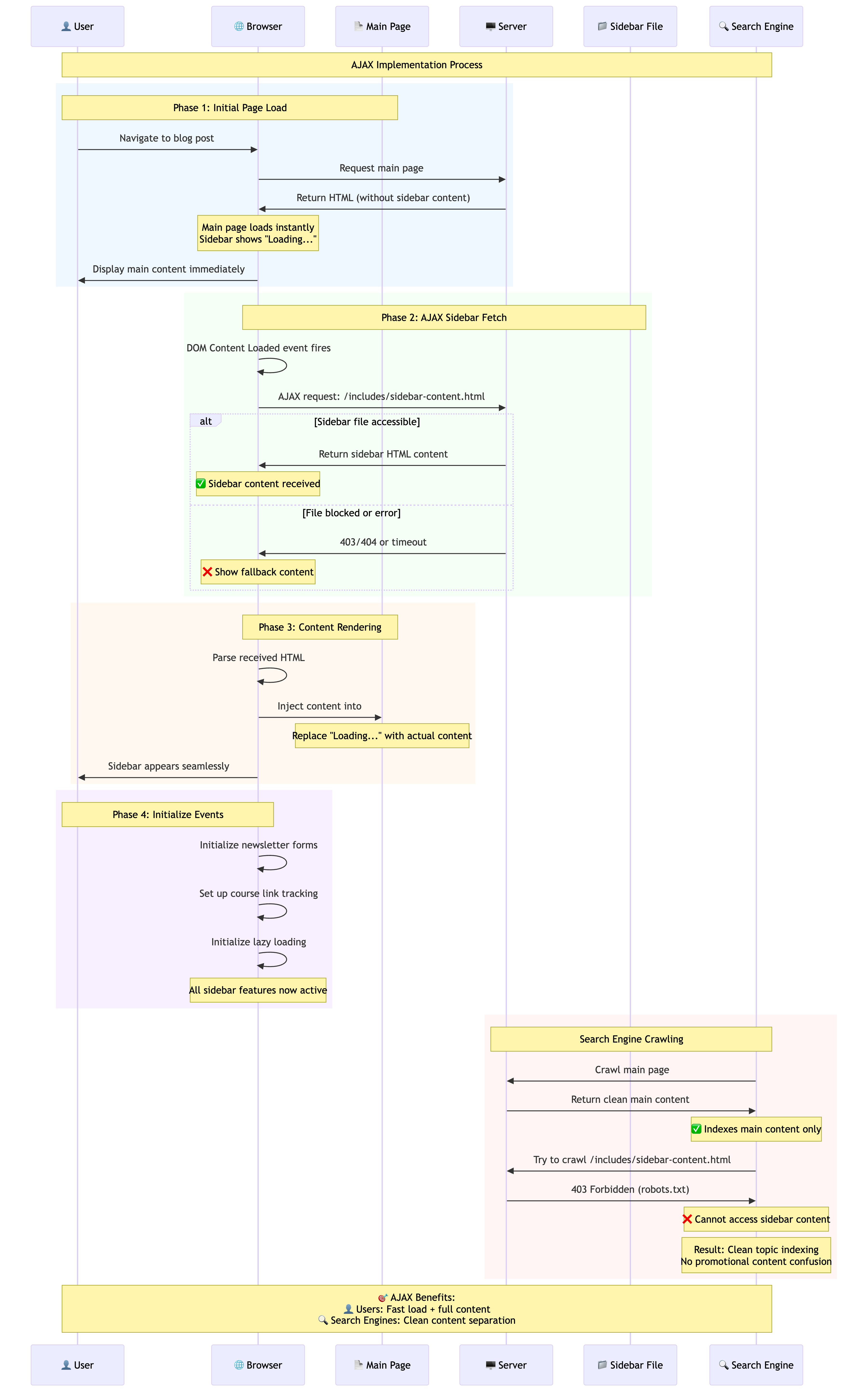
Main Page Structure:
<!DOCTYPE html>
<html lang="en">
<head>
  <meta charset="UTF-8">
  <meta name="viewport" content="width=device-width, initial-scale=1.0">
  <title>Photography Blog - Natural Light Mastery</title>
  <meta name="description" content="Master natural light photography with professional techniques and expert tips.">
</head>
<body>
  <main role="main">
    <article>
      <header>
        <h1>Mastering Natural Light Photography</h1>
        <p class="article-meta">Published on March 15, 2024 | By John Photography</p>
      </header>

      <section>
        <h2>Understanding Light Direction</h2>
        <p>Light direction dramatically affects the mood and quality of your photographs. Front lighting provides even illumination but can appear flat, while side lighting creates depth and dimension through shadows...</p>
      </section>

      <section>
        <h2>Best Times for Natural Light Photography</h2>
        <p>The quality of natural light changes throughout the day, offering different creative opportunities...</p>
      </section>
    </article>
  </main>

  <!-- Sidebar container for AJAX content -->
  <aside id="sidebar" role="complementary" data-nosnippet>
    <div class="loading-message">
      <p>Loading additional content...</p>
    </div>
  </aside>

  <!-- AJAX Implementation -->
  <script>
    // Function to load sidebar content
    async function loadSidebarContent() {
      try {
        const response = await fetch('/includes/sidebar-content.html');

        if (!response.ok) {
          throw new Error(`HTTP error! status: ${response.status}`);
        }

        const sidebarHTML = await response.text();
        const sidebarElement = document.getElementById('sidebar');

        // Insert the fetched content
        sidebarElement.innerHTML = sidebarHTML;

        // Initialize any sidebar functionality
        initializeSidebarFeatures();

      } catch (error) {
        console.error('Error loading sidebar content:', error);

        // Fallback content if AJAX fails
        document.getElementById('sidebar').innerHTML = `
          <div class="error-message">
            <p>Unable to load additional content.</p>
          </div>
        `;
      }
    }

    // Function to initialize sidebar features after loading
    function initializeSidebarFeatures() {
      // Newsletter form handling
      const newsletterForm = document.querySelector('#sidebar .newsletter-form');
      if (newsletterForm) {
        newsletterForm.addEventListener('submit', handleNewsletterSubmit);
      }

      // Course recommendation tracking
      const courseLinks = document.querySelectorAll('#sidebar .course-link');
      courseLinks.forEach(link => {
        link.addEventListener('click', trackCourseClick);
      });
    }

    // Newsletter form submission
    function handleNewsletterSubmit(event) {
      event.preventDefault();
      const email = event.target.querySelector('input[type="email"]').value;

      // Handle newsletter signup
      fetch('/api/newsletter-signup', {
        method: 'POST',
        headers: {
          'Content-Type': 'application/json',
        },
        body: JSON.stringify({ email: email })
      })
      .then(response => response.json())
      .then(data => {
        if (data.success) {
          event.target.innerHTML = '<p class="success">Thank you for subscribing!</p>';
        }
      })
      .catch(error => {
        console.error('Newsletter signup error:', error);
      });
    }

    // Course click tracking
    function trackCourseClick(event) {
      const courseName = event.target.textContent;

      // Analytics tracking
      if (typeof gtag !== 'undefined') {
        gtag('event', 'course_click', {
          'course_name': courseName,
          'source': 'sidebar_recommendation'
        });
      }
    }

    // Load sidebar content when page loads
    document.addEventListener('DOMContentLoaded', loadSidebarContent);
  </script>
</body>
</html>
AJAX vs iframe Considerations
You might be wondering: "If I need to load content from separate files, why not just use iframes instead of AJAX?" This is a common question that many developers ask when first learning about content separation techniques.
While iframes can technically achieve the goal of loading sidebar content from separate files, they come with significant drawbacks that make AJAX the superior choice for SEO content blocking. Let's examine why AJAX is the preferred method:
Performance Comparison:
| Method | Load Time | DOM Integration | SEO Control | User Experience |
|---|---|---|---|---|
| AJAX | Fast (async) | Full integration | Excellent | Seamless |
| iframe | Slower (blocking) | Isolated | Good | Can be clunky |
AJAX Advantages:
// AJAX loads asynchronously without blocking page render
fetch('/sidebar-content.html')
  .then(response => response.text())
  .then(html => {
    document.getElementById('sidebar').innerHTML = html;
    // Content integrates seamlessly with main page DOM
  });
iframe Limitations:
<!-- iframe creates separate document context -->
<iframe src="/sidebar-content.html" width="300" height="400">
  <!-- Content isolated from main page -->
  <!-- Styling and JavaScript integration more complex -->
  <!-- Can impact page load performance -->
</iframe>
Complete Implementation Workflow
Follow this step-by-step process to implement the complete multi-method approach for blocking partial content from indexing.
Step 1: Create Separate Content Files
Create /includes/sidebar-content.html:
<!DOCTYPE html>
<html lang="en">
<head>
  <meta name="robots" content="noindex, nofollow">
  <meta name="googlebot" content="noindex, nofollow">
  <title>Sidebar Content - Not for Indexing</title>
</head>
<body>
  <div class="sidebar-content">
    <!-- Course Recommendations -->
    <section class="course-recommendations">
      <h3>Recommended Photography Courses</h3>
      <div class="course-list">
        <div class="course-item">
          <h4><a href="/courses/portrait-photography" class="course-link">Portrait Photography Masterclass</a></h4>
          <p>Learn professional portrait techniques from industry experts.</p>
          <span class="course-price">$99</span>
        </div>

        <div class="course-item">
          <h4><a href="/courses/landscape-photography" class="course-link">Landscape Photography Pro</a></h4>
          <p>Master composition and lighting for stunning landscape shots.</p>
          <span class="course-price">$129</span>
        </div>
      </div>
    </section>

    <!-- Newsletter Signup -->
    <section class="newsletter-signup">
      <h3>Photography Tips Newsletter</h3>
      <p>Get weekly photography tips, gear reviews, and exclusive tutorials delivered to your inbox.</p>

      <form class="newsletter-form" action="/api/newsletter" method="post">
        <div class="form-group">
          <label for="email">Email Address</label>
          <input type="email" id="email" name="email" required placeholder="[email protected]">
        </div>

        <div class="form-group">
          <label>
            <input type="checkbox" name="terms" required>
            I agree to receive marketing emails and acknowledge the privacy policy.
          </label>
        </div>

        <button type="submit" class="subscribe-btn">Subscribe Now</button>
      </form>
    </section>

    <!-- Social Proof -->
    <section class="social-proof">
      <h3>Join 50,000+ Photographers</h3>
      <div class="testimonial">
        <blockquote>
          "This newsletter transformed my photography skills in just 3 months!"
        </blockquote>
        <cite>- Sarah Johnson, Professional Photographer</cite>
      </div>

      <div class="social-links">
        <a href="/instagram" target="_blank">Follow on Instagram</a>
        <a href="/youtube" target="_blank">YouTube Channel</a>
      </div>
    </section>
  </div>
</body>
</html>
Step 2: Configure Robots.txt
Update /robots.txt:
User-agent: *
Allow: /

# Block sidebar and promotional content
Disallow: /includes/sidebar-content.html
Disallow: /includes/sidebar/
Disallow: /widgets/
Disallow: /promotional/

# Block newsletter and conversion pages
Disallow: /newsletter-signup/
Disallow: /course-recommendations/
Disallow: /conversion-elements/

# Allow main content directories
Allow: /blog/
Allow: /articles/
Allow: /courses/
Allow: /tutorials/

# Block admin and utility pages
Disallow: /admin/
Disallow: /wp-admin/
Disallow: /api/

# Sitemap location
Sitemap: https://yoursite.com/sitemap.xml
Sitemap: https://yoursite.com/blog-sitemap.xml
Step 3: Implement HTML Integration
Main blog post template:
<!DOCTYPE html>
<html lang="en">
<head>
  <meta charset="UTF-8">
  <meta name="viewport" content="width=device-width, initial-scale=1.0">
  <title>{{ article.title }} - Photography Pro Blog</title>
  <meta name="description" content="{{ article.meta_description }}">

  <!-- Structured data for main content -->
  <script type="application/ld+json">
  {
    "@context": "https://schema.org",
    "@type": "Article",
    "headline": "{{ article.title }}",
    "description": "{{ article.meta_description }}",
    "author": {
      "@type": "Person",
      "name": "{{ article.author }}"
    },
    "datePublished": "{{ article.publish_date }}",
    "mainEntityOfPage": {
      "@type": "WebPage",
      "@id": "{{ article.url }}"
    }
  }
  </script>
</head>
<body>
  <!-- Main content wrapper -->
  <div class="container">
    <main role="main" class="main-content">
      <article itemscope itemtype="http://schema.org/Article">
        <header class="article-header">
          <h1 itemprop="headline">{{ article.title }}</h1>
          <div class="article-meta">
            <time itemprop="datePublished" datetime="{{ article.publish_date }}">
              {{ article.formatted_date }}
            </time>
            <span class="author" itemprop="author">By {{ article.author }}</span>
            <span class="read-time">{{ article.read_time }} min read</span>
          </div>
        </header>

        <div itemprop="articleBody" class="article-content">
          {{ article.content }}
        </div>

        <footer class="article-footer">
          <div class="tags">
            {% for tag in article.tags %}
            <span class="tag">{{ tag }}</span>
            {% endfor %}
          </div>
        </footer>
      </article>
    </main>

    <!-- Sidebar with multi-method blocking -->
    <aside id="dynamic-sidebar" role="complementary" data-nosnippet class="sidebar">
      <div class="sidebar-loading">
        <p>Loading recommendations...</p>
        <div class="loading-spinner"></div>
      </div>
    </aside>
  </div>

  <!-- AJAX Implementation with Error Handling -->
  <script>
    class SidebarManager {
      constructor() {
        this.sidebarElement = document.getElementById('dynamic-sidebar');
        this.maxRetries = 3;
        this.retryDelay = 1000; // 1 second
        this.currentRetry = 0;
      }

      async loadSidebar() {
        try {
          const response = await fetch('/includes/sidebar-content.html', {
            method: 'GET',
            headers: {
              'Cache-Control': 'no-cache',
              'X-Requested-With': 'XMLHttpRequest'
            }
          });

          if (!response.ok) {
            throw new Error(`Failed to load sidebar: ${response.status}`);
          }

          const html = await response.text();
          this.renderSidebar(html);
          this.initializeSidebarEvents();

        } catch (error) {
          console.error('Sidebar loading error:', error);
          this.handleLoadError();
        }
      }

      renderSidebar(html) {
        // Create a temporary container to parse HTML
        const tempDiv = document.createElement('div');
        tempDiv.innerHTML = html;

        // Extract only the body content
        const bodyContent = tempDiv.querySelector('.sidebar-content');

        if (bodyContent) {
          this.sidebarElement.innerHTML = bodyContent.outerHTML;
        } else {
          throw new Error('Invalid sidebar content structure');
        }
      }

      initializeSidebarEvents() {
        // Newsletter form submission
        const newsletterForm = this.sidebarElement.querySelector('.newsletter-form');
        if (newsletterForm) {
          newsletterForm.addEventListener('submit', this.handleNewsletterSubmit.bind(this));
        }

        // Course link tracking
        const courseLinks = this.sidebarElement.querySelectorAll('.course-link');
        courseLinks.forEach(link => {
          link.addEventListener('click', this.trackCourseClick.bind(this));
        });

        // Lazy load course images if any
        this.initializeLazyLoading();
      }

      async handleNewsletterSubmit(event) {
        event.preventDefault();

        const form = event.target;
        const submitButton = form.querySelector('.subscribe-btn');
        const originalText = submitButton.textContent;

        // Disable button and show loading state
        submitButton.disabled = true;
        submitButton.textContent = 'Subscribing...';

        try {
          const formData = new FormData(form);
          const response = await fetch('/api/newsletter-signup', {
            method: 'POST',
            body: formData,
            headers: {
              'X-Requested-With': 'XMLHttpRequest'
            }
          });

          const result = await response.json();

          if (result.success) {
            form.innerHTML = `
              <div class="success-message">
                <h4>Thank you for subscribing!</h4>
                <p>Check your email for a confirmation link.</p>
              </div>
            `;

            // Track successful subscription
            this.trackEvent('newsletter_signup', 'success');

          } else {
            throw new Error(result.message || 'Subscription failed');
          }

        } catch (error) {
          console.error('Newsletter signup error:', error);

          // Show error message
          const errorDiv = document.createElement('div');
          errorDiv.className = 'error-message';
          errorDiv.innerHTML = '<p>Subscription failed. Please try again later.</p>';
          form.appendChild(errorDiv);

          // Restore button
          submitButton.disabled = false;
          submitButton.textContent = originalText;

          // Track failed subscription
          this.trackEvent('newsletter_signup', 'error');
        }
      }

      trackCourseClick(event) {
        const link = event.target.closest('.course-link');
        const courseName = link.textContent.trim();
        const courseUrl = link.href;

        this.trackEvent('course_click', 'sidebar_recommendation', {
          course_name: courseName,
          course_url: courseUrl,
          position: Array.from(link.closest('.course-list').children).indexOf(link.closest('.course-item'))
        });
      }

      trackEvent(action, category, customData = {}) {
        // Google Analytics 4 tracking
        if (typeof gtag !== 'undefined') {
          gtag('event', action, {
            event_category: category,
            ...customData
          });
        }

        // Custom analytics tracking
        if (window.customAnalytics) {
          window.customAnalytics.track(action, {
            category: category,
            ...customData,
            timestamp: new Date().toISOString(),
            page_url: window.location.href
          });
        }
      }

      initializeLazyLoading() {
        const images = this.sidebarElement.querySelectorAll('img[data-src]');

        if ('IntersectionObserver' in window) {
          const imageObserver = new IntersectionObserver((entries, observer) => {
            entries.forEach(entry => {
              if (entry.isIntersecting) {
                const img = entry.target;
                img.src = img.dataset.src;
                img.removeAttribute('data-src');
                observer.unobserve(img);
              }
            });
          });

          images.forEach(img => imageObserver.observe(img));
        } else {
          // Fallback for older browsers
          images.forEach(img => {
            img.src = img.dataset.src;
            img.removeAttribute('data-src');
          });
        }
      }

      handleLoadError() {
        this.currentRetry++;

        if (this.currentRetry <= this.maxRetries) {
          console.log(`Retrying sidebar load (${this.currentRetry}/${this.maxRetries})...`);

          setTimeout(() => {
            this.loadSidebar();
          }, this.retryDelay * this.currentRetry);

        } else {
          console.error('Max retries reached. Showing fallback content.');
          this.showFallbackContent();
        }
      }

      showFallbackContent() {
        this.sidebarElement.innerHTML = `
          <div class="sidebar-fallback">
            <h3>Explore More</h3>
            <p>Discover our photography courses and tutorials.</p>
            <a href="/courses" class="cta-button">View All Courses</a>
          </div>
        `;
      }
    }

    // Initialize sidebar when DOM is ready
    document.addEventListener('DOMContentLoaded', () => {
      const sidebarManager = new SidebarManager();
      sidebarManager.loadSidebar();
    });

    // Preload sidebar content for better performance
    if ('requestIdleCallback' in window) {
      requestIdleCallback(() => {
        fetch('/includes/sidebar-content.html', { method: 'HEAD' });
      });
    }
  </script>

  <!-- CSS for loading states and sidebar styling -->
  <style>
    .sidebar-loading {
      display: flex;
      align-items: center;
      justify-content: center;
      flex-direction: column;
      padding: 2rem;
      text-align: center;
    }

    .loading-spinner {
      width: 30px;
      height: 30px;
      border: 3px solid #f3f3f3;
      border-top: 3px solid #3498db;
      border-radius: 50%;
      animation: spin 1s linear infinite;
      margin-top: 1rem;
    }

    @keyframes spin {
      0% { transform: rotate(0deg); }
      100% { transform: rotate(360deg); }
    }

    .success-message {
      background-color: #d4edda;
      border: 1px solid #c3e6cb;
      color: #155724;
      padding: 1rem;
      border-radius: 4px;
      margin-top: 1rem;
    }

    .error-message {
      background-color: #f8d7da;
      border: 1px solid #f5c6cb;
      color: #721c24;
      padding: 1rem;
      border-radius: 4px;
      margin-top: 1rem;
    }

    .sidebar-fallback {
      text-align: center;
      padding: 2rem;
      background-color: #f8f9fa;
      border-radius: 8px;
    }

    .cta-button {
      display: inline-block;
      background-color: #007bff;
      color: white;
      padding: 0.75rem 1.5rem;
      text-decoration: none;
      border-radius: 4px;
      margin-top: 1rem;
      transition: background-color 0.3s ease;
    }

    .cta-button:hover {
      background-color: #0056b3;